DOCOM Create document
This section allows you to input all necessary data for generating a Traces Export Document (DOCOM).
On the left side of the screen, you will see the information as it is retrieved from the planning or ERP system. These values are automatically translated by Docmation into the format required by the Traces Webgate. If no translation exists for a specific value, the system will use the incoming value as is.
If you modify any data in the right-hand field, a custom translation will be created. For example, if the field Operator Code contains the value "RedSquare" and you change it to EM.12345.000-12, the latter code will be used in the MAD document. For future work items, the system will automatically translate "RedSquare" to EM.12345.000-12 whenever it appears in the Operator Code field.
Fertilizer classification
The final FERTILISER code, within the Select commodities dropdown. Example: 142/2011 (2019/1084).
Recommended value from Planningsoftware API: Manure type.
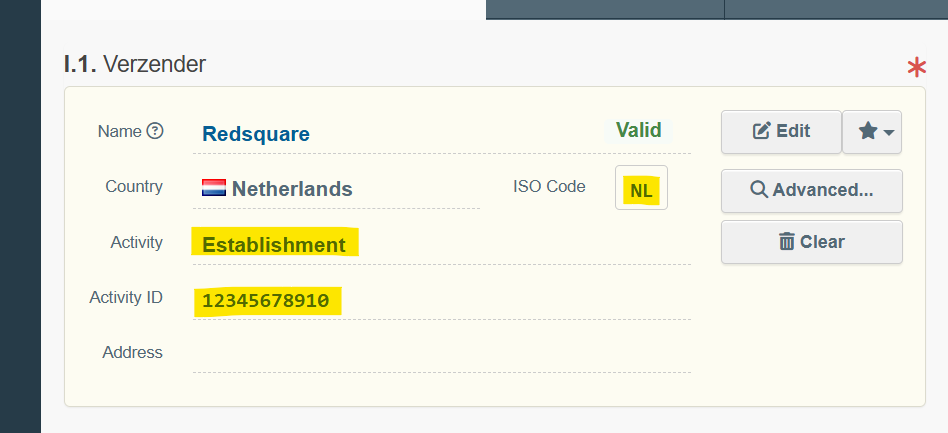
I.1. Sender
The Sender (Verzender) field contains the Activity ID of the party sending the manure. Example: 12345678910.
The Sender type (Activity) field contains the Activity of the party sending the manure. Example: Establishment.
The Sender country code (ISO Code) field contains the Country code of the party sending the manure. Example: NL.
Recommended value for all 3 fields, from Planningsoftware API: Name and ID of the sending party
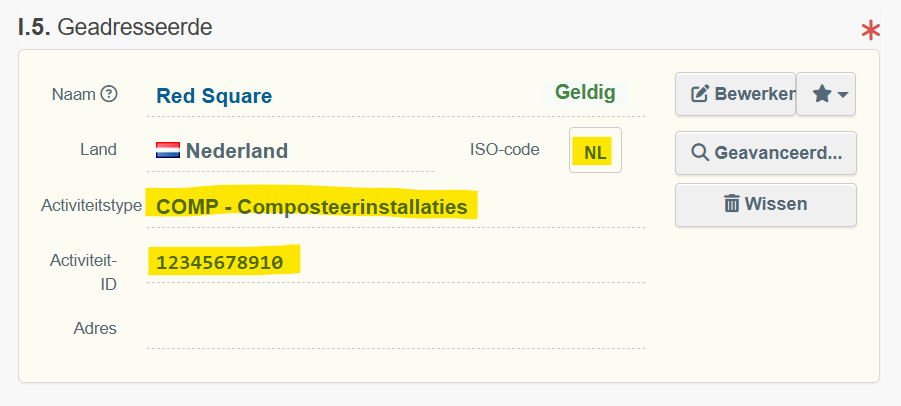
I.5. Receiver
The Receiver (Geadresseerde) field contains the Activity ID of the party receiving the manure. Example: 12345678910.
The Receiver type (Activity) field contains the Activity of the party receiving the manure. Example: COMP - Composteerinstallaties.
The Reciver country code (ISO Code) field contains the Country code of the party receiving the manure. Example: NL.
Recommended value for all 3 fields, from Planningsoftware API: Name and ID of the receiving party
I.31. Goods, Processing company Verwerkingsbedrijf
The Processing company (Verwerkingsbedrijf) field contains the Activity ID of the processing company of the manure. Example: 12345678910.
The Processing company type (Activity) field contains the Activity of the processing company of the manure. Example: COMP - Composteerinstallaties.
The Processing company country code (ISO Code) field contains the Country code of the processing company of the manure. Example: NL.
Recommended value for all 3 fields, from Planningsoftware API: Name and ID of the processing company (usually the receiving party)
